INTRODUCTION TO COMPUTER SCIENCE (2026 SPRING)
*** REMINDER ***
The course is particularly designed for the College of Management BBA program (excluding the BBA in MIS) and
the International Bachelor Program in Agribusiness (IBPA).
Their credits earned are accounted for the credits required for graduation.
Students from other programs might not be allowed to take this course and so
the credits earned are not accounted for graduation. Please consult your department office for further information.
*** REMINDER END ***
MUST DOWNLOAD & READ! CLASS SCHEDULE 2026 SPRING & CODE OF CONDUCT
RECOMMENDED! Comments (both good and bad) from former students on DCard!
COURSE OBJECTIVES
The primary objective of this course is to provide introductory level knowledge for students on the working principles of a computer and the Internet;
and how to instruct (i.e. program) a computer to solve simple problems.
Students will learn the basic working principles of computer technologies,
inlcuding (i) how a computer is organized and (ii) how Internet works.
Certain advanced concepts regarding computer science will be introduced.
Moreover, students are expected to appreciate the scholars who have contributed great ideas in computer science and
the area of information and communication technology (ICT).
Students are expected to learn not to abuse the usages of such technologies.
MEDIUM OF INSTRUCTION
The medium of instruction of this course is English. All teaching materials including handouts, test papers
examination papers, assignments and supplementary materials are in English.
PRE-REQUISITES
- Able to read, write, speak and listen English.
- Skillful in using browsers, like Chrome, Safari and Edge, to access Internet searching for information on the web.
- Able to edit reports using a word processing software in Windows, MacOS or on a cloud, like MS WORD, Latex, PAGES and Google DOCs.
COURSE CONTENTS
- Computer (Computing Machine) Everywhere
- Desktop/Notebook computer
- Personal: Word processing, financial management, file storage, email, information search.
- Entertainment: Watch video, play music, online games.
- Social networking: Facebook, LINE, WhatsApp, Weibo.
- Professional: Photo/Film editing, fashion design, software development, scientific research.
- Some skills in the use of computer and cell phone - Password setting, log-out, backup.
- Access large language models, like ChatGPT, Gemini, Grok and Llama; and other AI tools.
- (*) Some application software require Internet access for connecting to enable their usages.
- Smartphone
- Personal: Telephone call, email, information search.
- Entertainment: Watch video, play music, online games, take photos.
- Social networking: Facebook, LINE, WhatsApp, Weibo.
- Access large language models, like ChatGPT, Gemini, Grok and Llama; and other AI tools.
- (*) Almost all application software require Internet access to enable their usages.
- Home network
- Internet connection for the use of advanced features, like voice assistant and web search.
- Home devices and appliances are connected via wireless communication.
- Amazon ECHO, Google HOME.
- (*) Internet access is required.
- Personal network
- Cell phone, bluetooth earphone/mic/headset, notebook computer, pad, iWatch, smart glasses, smart wristband and other wearable mobile devices.
- The samrtphone can be act as a server coordinating those devices.
- Others
- In elevator system, a part of its control is conducted by a computer.
- In a vehicle, computer is used in auto-driving and in-car devices control.
- History of Computer
- A demo of Charles Babbage's Difference Engine.
- BBC Documentary 1991 Edition
- Computer History ENIAC: Starting up the ENIAC! ENIAC stands for Electronic Numerical Integrator And Computer.
- Computer History Archies Project.
- Computer Pioneers: Pioneer Computers: Part 1, Part 2, from Computer History Museum recorded in 1996.
- QWERTY keyboard layout.
- CPU Development History, 2025 (Narrative in Chinese with English transcript).
- Xerox Alto (1973).
- A Demo of the Xerox Alto and Xerox Star (1982 version), the first computer with graphical user interface for a user to interact with the operating system and a word processing software called Xeorx Star by moving and clicking the mouse together with function keys on the keyboard.
- Xerox Alto together with a local computer network (the local area network (LAN)) demonstrated the capability of files transfer and sharing among computers.
- How Steve Jobs got the ideas of GUI from XEROX.
- Electronic Typewriter.
- Wang Lab, a story about early electronic calculators and computers.
- Breaking through products introduced by Steve Jobs.
- Apple PC (1975): Home affordable computer.
- Computers LISA and Macintosh with MacOS (1984): The OS interface design is inspired by Xerox Alto. Apple exceled the design with a user-friendly graphical user interface (GUI) but no function key needed. It influenced the Microsoft to launch Microsoft Windows in November 1985.
- iTune (2001): A platform for music sharing and retail. A new business model for song retail and rental. It influenced the KKBox releasing its music platform on October 2004.
- iPhone (2007): A smartphone which let user connecting to the world via telecommunicating network or Internet. It influenced Google to work together with HTC to release HTC Dream, the first Android phone, in 2008.
- App Store (July 2008): A platform for iOS app sharing and retail. It influenced Google to launch the platform Google Play on Septemeber 2008 for the Android app sharing and retail.
- Desktop/Personal Computer (1975 - ).
- (1970s-1980s) Apple, Commodore, HP, IBM, MITS, NEC, Sinclair, Tandy, Wang, Xerox.
- IBM PC (1981-1987).
- Application systems, including but not limited to word processing software, spreadsheet software and database management system, were developed for the IBM PC and its Compitables.
- Scientific calculators and software for presentation slides preparation were developed.
- Notes
- During the WWII, UK, USA and Germany had electronic computers. Besides, radio communication technology playes an important role for message communication.
- The world first two commercial computers are called LEO (1951) by John Lyon and Co. and UNIVAC (1951) by Remington Rand.
- LEO stands for Lyon Electronic Office and UNIVAC stands for Universal Automatic Computer.
- Business process reengineering (1990), a concept and an inevitable move in the 1980s when computers, software and computer network had been widely used in the industry. Follow by the web technology developed and released in the 1990s, many firms had been undergone reengineering for a decade.
- Question: What is(are) the advantage(s) and disadvantage(s) of using radio communication technology for message communication?
- Industrial Applications of Computer and Internet.
- Generic application: Data collection and storage, data processing and reporting.
- Additional application: Word processing and presentation slides preparation.
- Information Systems. (4.5M, Not updated yet!)
- E-Commerce.
- Amazon fulfilment center.
- Robot powered warehouse.
- Question: Who is going to collect the data and how?
- Question: From the generic data collection/processing to information collection/processing, what problems an information system developer has to deal with?
- Information (Data) Storage and Retrival
- Challenges in ISR - Minimize the memory stroage of a file (a collection of data) and miximize the efficient of file (or data) retrival
- Types of information - Text, audio, image, video, hypertext, document, data file, software
- File extensions - .txt, .mp3, .jpeg, .img, .mpg, .html, .doc (.docx), .ppt (.pptx), .pdf, .xls (.xlsx), .mdb (.accdb) .exe
- Structural data - Text, number, date/time, currency, yes/no, categorical data
- Database (Structural data) -> File -> Record -> Field -> Byte -> Bit
- Giant information base - World Wide Web
- Hardware
- Common devices.
- Computer, iPad, iPhone, iWatch.
- VR/AR headset, Microsoft Hololens, Apple Glasses.
- Printer, 3D printer, keyboard, monitor, mouse.
- Processor: CPU, GPU and XPU.
- Working principles of a processor.
- Note: Numbers can be represented in fix-point format and floating-point format. Different formats will lead to different digital logic circuit designs for the realizations of addition, subtraction, multiplication and division.
- Operating Systems
- Software
- Networking - Communications amongst computers and mobile devices
- Programming(*) - Building software/apps
- C Language
- Other programming languages - C++, Java, Python, Scripting language, R Language
- Programming languages for scientific research - SPSS, SAS, Matlab, Mathematica, Maple
- Application program interface (API) - Set of instructions for a software to access application programs that are available over the Internet
- Programming language for database management - SQL (Structured Query Language)
- Advanced programming - Systems programming and network programming
- Algorithm(*) - An algorithm is a step-by-step procedure for solving a problem.
- Problem dependent - Usually, each algorithm can only be designed to solve one problem.
- An algorithm is the procedure to be implemented by a computer program.
- The actual implementation of an algorithm is programming language dependent. Some algorithms could be easily be implemented by one programming language but hardly be implemented by another programming language.
- Some problems
- Medium access control (MAC), message routing
- Data storage problem
- Sorting numbers in ascending order: Program code
- Finding the roots of a function f(x)
- Jobs allocation problem (in operating system)
- Production scheduling problem
- Traveling salesman problem
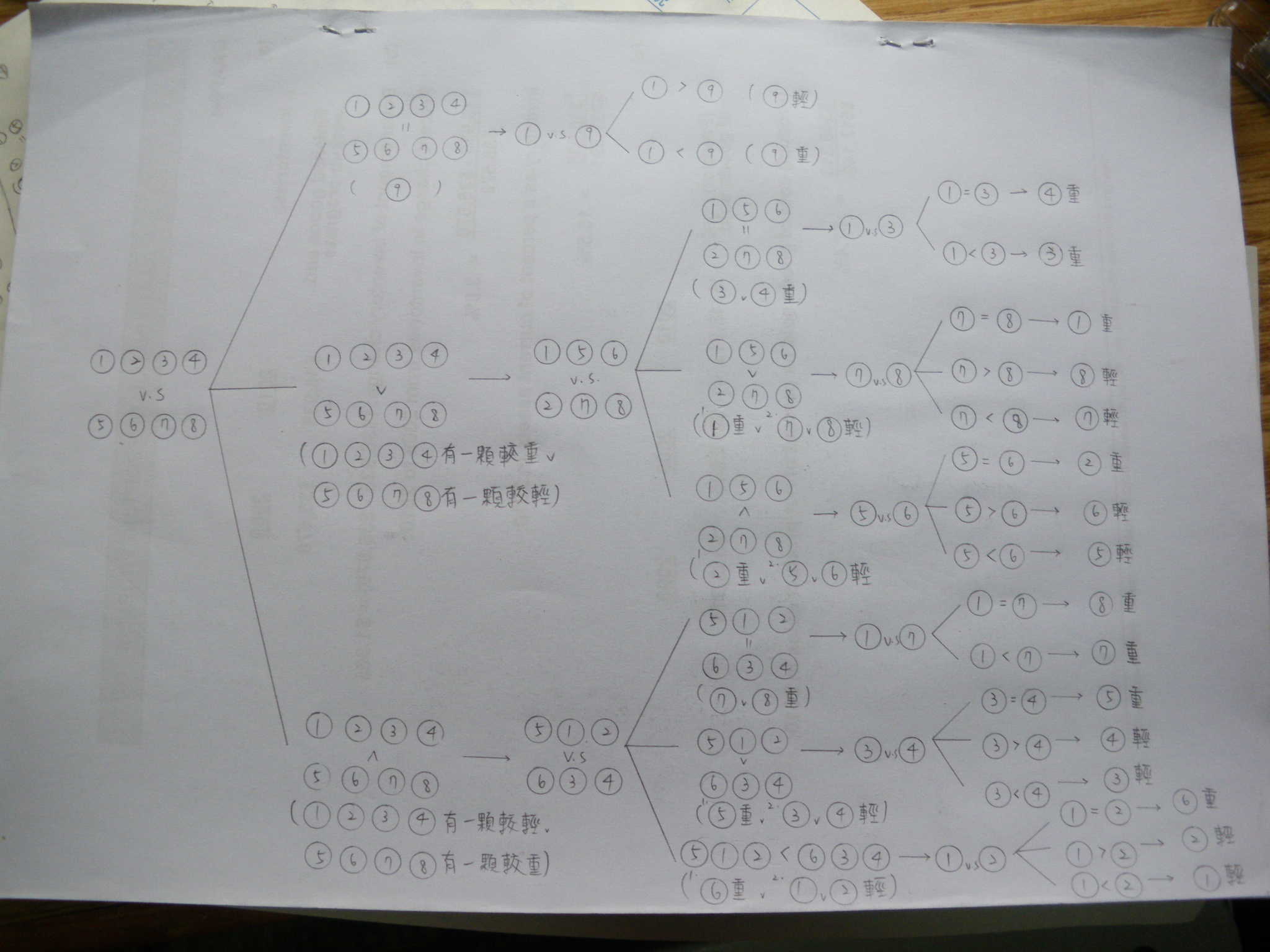
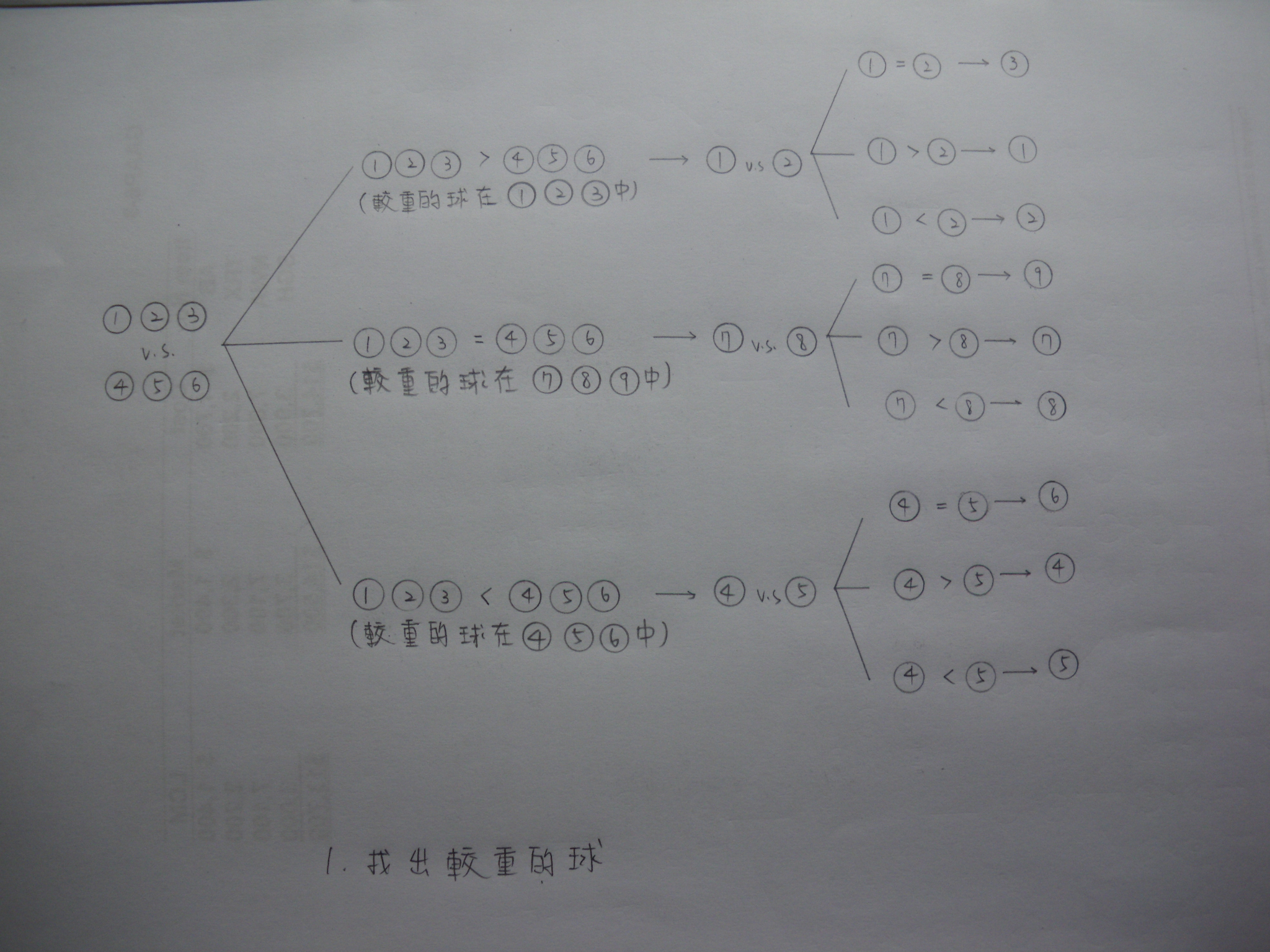
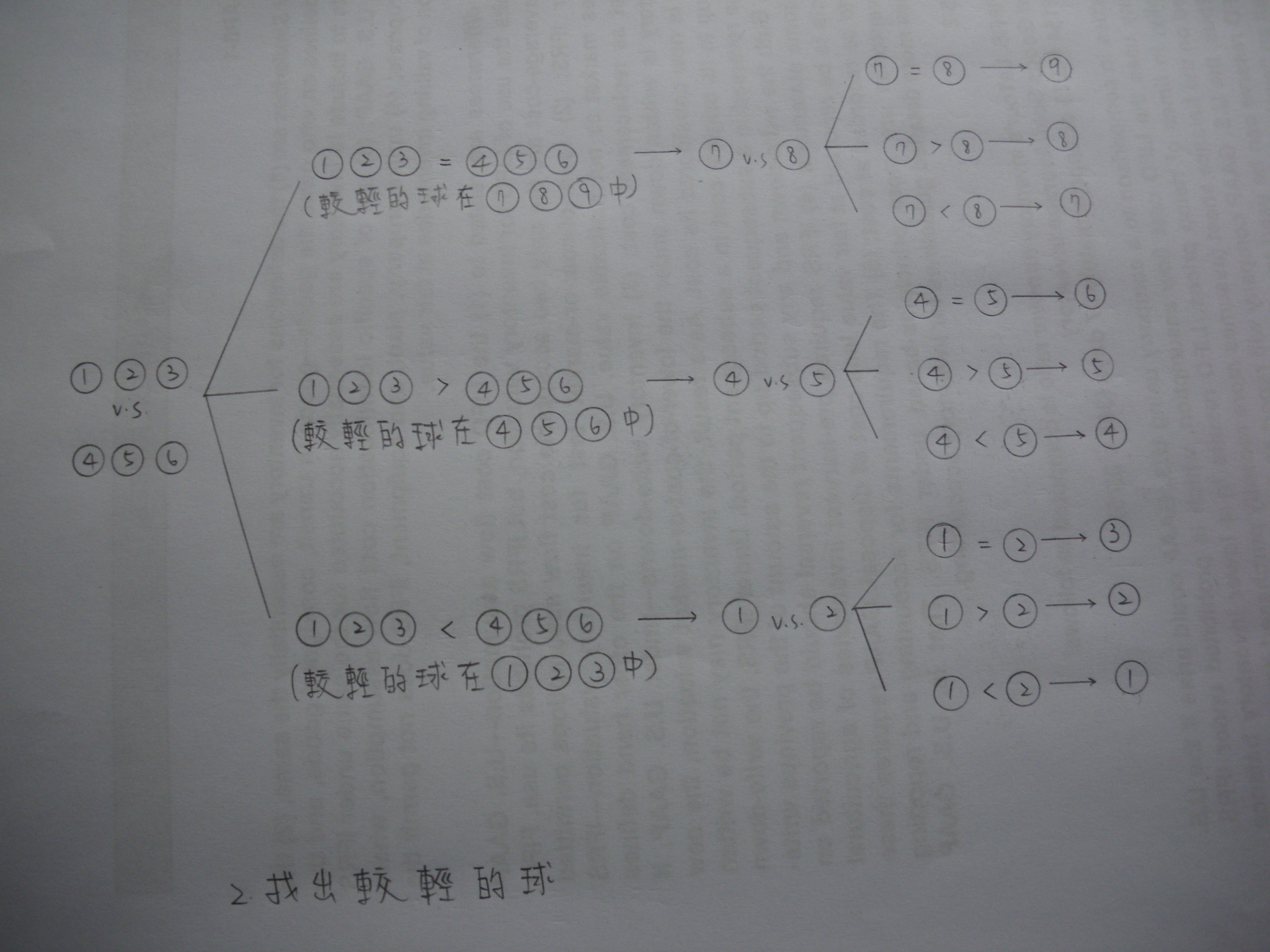
- 9-Ball Problem (One abnormal ball)P1, P2, P3
- 9-Ball Problem (N abnormal balls)
- Complexity (Computational compelxity and memory complexity) - Measure for the efficiency of an algorithm and the difficulty of a problem
- Compared with Standard Operating Procedure (SOP)
- Advanced Topics in Computer Science (TBD)
- Nanotechnology
- AI and machine learning
- Brain machine interface
ASSIGNMENTS/TEST PAPERS/REVIEW QUESTIONS
- Assignment 01 Due Date: March 06, 2026.
- Assignment 02 Due Date: March 13, 2026.
- Assignment 03 Due Date: March 27, 2026.
- Assignment 04 Due Date: April 03, 2026.
- Assignment 05 Due Date: April 10, 2026.
- Assignment 06 Due Date: April 17, 2026.
- Assignment 07 Due Date: April 24, 2026.
- Assignment 08 Due Date: May 01, 2026.
- Assignment 09 Due Date: May 15, 2026.
- Assignment 10 Due Date: May 22, 2026.
- Assignment 11 Due Date: May 29, 2026.
- Assignment 12 Due Date: June 04, 2026.
EXERCISES
- Review Questions: Networking and Network Security
- Review Questions: The Internet Behind the Web
- Review Questions: History of Computer, Inforamtion Systems, E-Commerce, Digital Systems
- Review Questions: Digital Systems, Software, Operating Systems
- Review Questions: C Programming
ASSESSMENTS
- Assignments (Bonus) [-13% to 13%]
- Class Tests (Bonus) [-6% to 6%]
- Mid-term Examination [50%]
- Final Examination [50%]
TEACHING MATERIALS
- Lecture Notes available on Course Homepage
- Lecture Notes written on Blackboard
- Handouts to be distributed in the class
- Video on Youtube
- Articles on Wikipedia
- Articles from magazines
- Past Papers (Very useful for your examination!)
- 2012 Fall: Mid-term Examination, Final Examination.
- 2013 Fall: Mid-term Examination, Final Examination.
- 2014 Fall: Mid-term Examination, Final Examination.
- 2015 Fall: Mid-term Examination, Final Examination.
- 2016 Fall: Mid-term Examination, Final Examination.
- 2017 Fall: Mid-term Examination, Final Examination.
- 2018 Fall: Mid-term Examination, Final Examination.
- 2019 Fall: Mid-term Examination, Final Examination.
- 2020 Spring: Final Examination.
- 2020 Fall: Mid-Term Examination, Final Examination.
- 2021 Fall: Mid-Term Examination, Final Examination.
- 2022 Fall: Mid-Term Examination, Final Examination.
- 2026 Spring: Mid-Term Examination.
- Model answers for the past exam papers.